The Real Guide to Receiving Free Shein Products
Anúncios
A practical tutorial sourced from official Shein support: access the menu, submit requests, track responses, publish your review, check your score, and resubmit the analysis if the first version is rejected.
Independent educational disclaimer — Prepared with public data extracted from Shein’s Free Trial dashboard. We have no affiliation with Shein. The selection process is limited and does not guarantee approval. Carefully read the platform guidelines before participating.
Reasons why applications get stuck
The system processes a massive volume of requests daily. Applications are commonly denied due to incomplete profile data, country discrepancies on the account, exhausted weekly limits, or a final report lacking relevant details.
To improve your chances, focus on what you can control: enter your exact measurements, ensure a shipping address matching the site’s country, submit applications early in the cycle, and upload a detailed review if you receive the product. Competition remains high and selection is never guaranteed.
Understand how the Free Trial works
This section is dedicated to product evaluation on the Shein platform. Selected members receive an item free of charge to try out and post an honest review of their practical experience. Upon approval, a zero-dollar order is generated and shipped to your address.
Anúncios
The item catalog is updated frequently with limited stock. Maintaining an active profile, applying quickly, and having a history of quality reviews can aid system evaluations—however, they do not guarantee you will be chosen.
Frequently available categories
Apparel & Trends: t-shirts, dresses, jeans, jackets, and seasonal clothing.
Beauty & Care: makeup items, skincare, and personal care products.
Fashion Accessories: handbags, everyday jewelry, belts, and various items.
Home & Living: decorative items, organizers, and household utensils.
1Access the Free Trial Center
Log into your account. In the app: go to Profile → More Services (or Other Services) → Free Trial Center. On desktop, click Free Trial under the services tab. Explore the week’s products—the selection refreshes regularly.
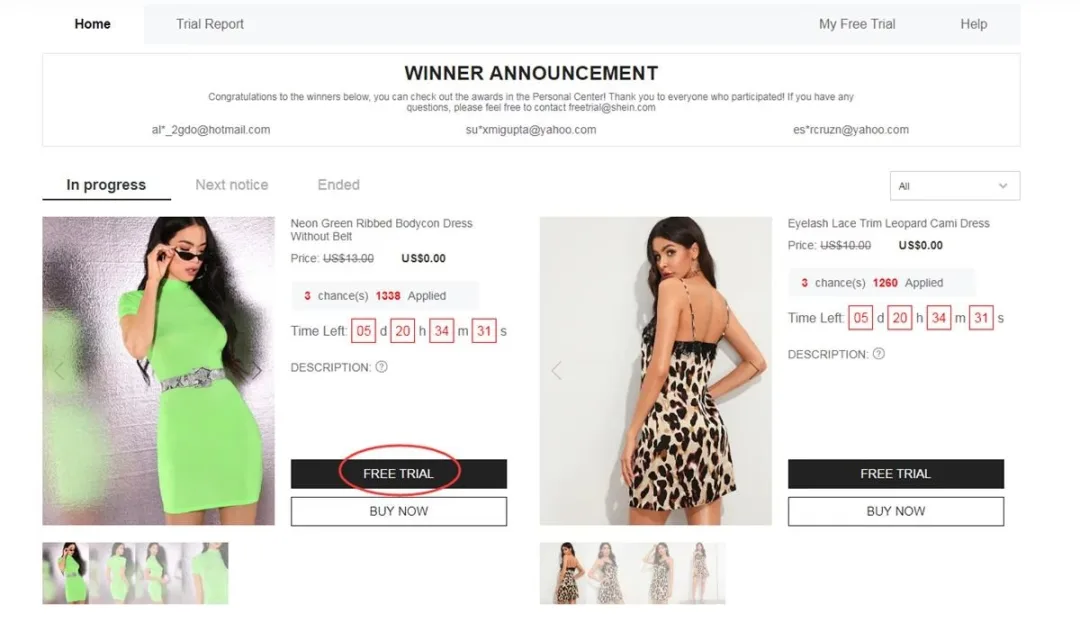
Official feature location in app settings
Anúncios
Select up to 3 products per week
Each account gets 3 weekly attempts. Unused attempts expire and do not roll over. Choose the Free Trial option, select the appropriate size, verify that your delivery address matches the same country as the Shein domain you are logged into, and confirm. Location mismatches will instantly disqualify your application.
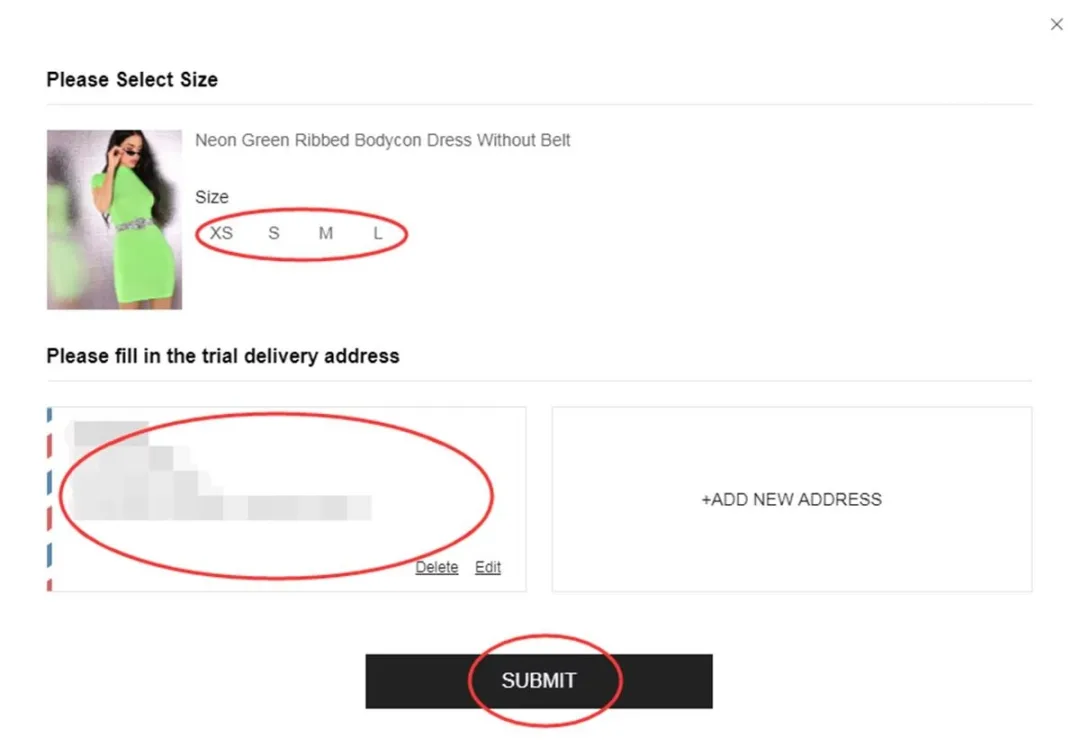
Size selection and shipping address validation
3Check status in My Applications
Results usually take about one week to update. Click on My Applications / My Free Trial. An Approved status indicates a free order was generated for shipping. A Rejected status means the item was not granted—allowing you to try again the following week.
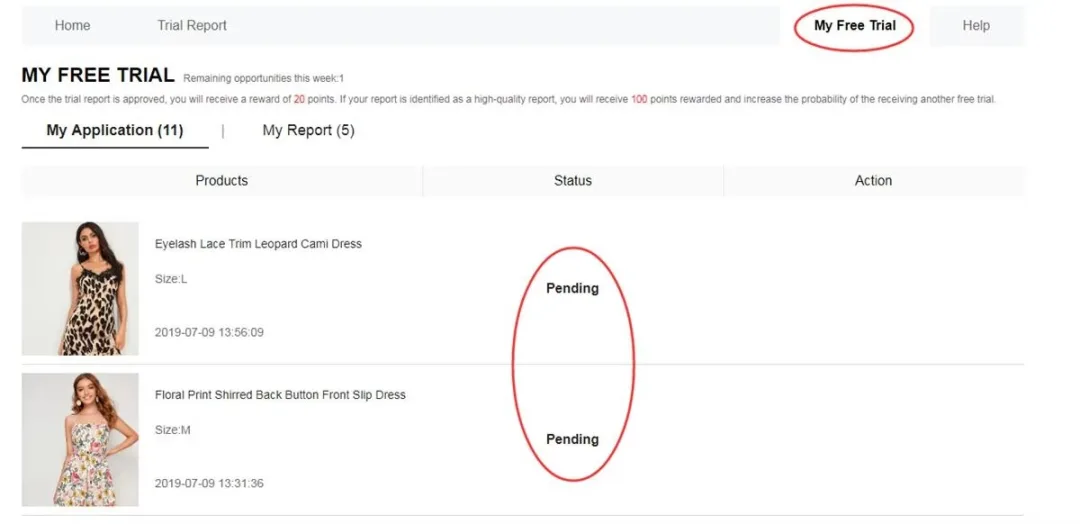
Dashboard to monitor request status
4Publish review within 10 days
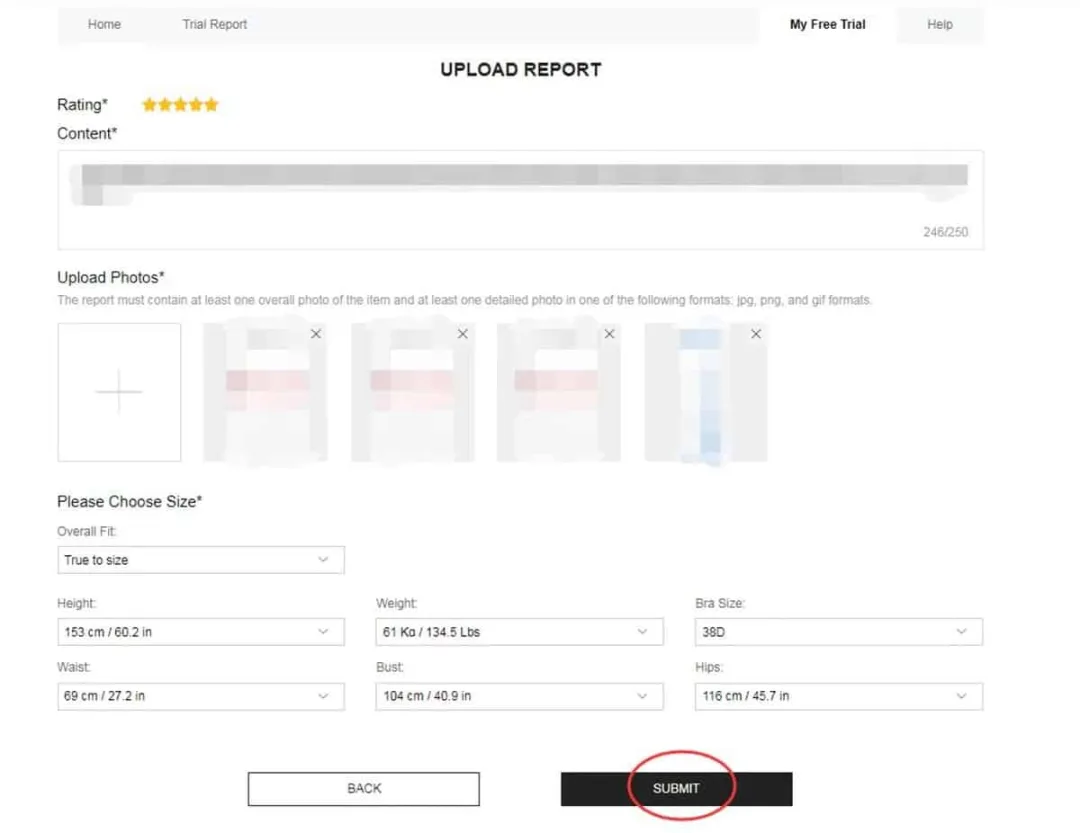
Once your order arrives, try the item on and detail your thoughts regarding fit, fabric texture, overall quality, and wearability. A complete review features a full-body photo wearing the item, two close-up photos highlighting stitching or details, plus pros and cons. Submit via Submit Report / My Report within 10 calendar days.
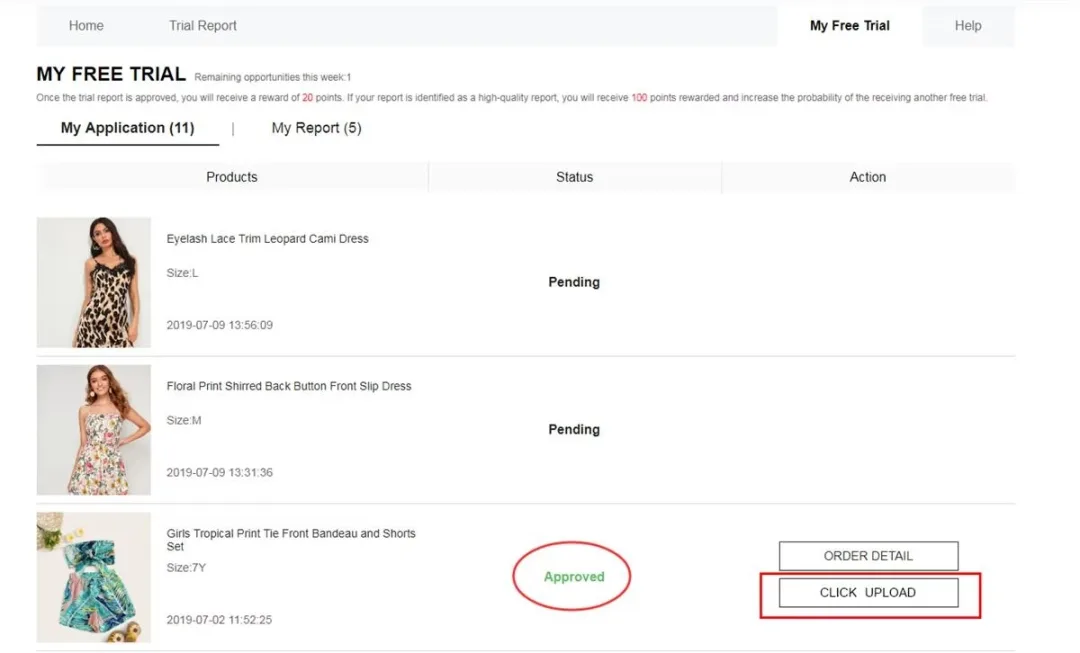
Review submission form with text and image attachments
5Monitor review status and credited points
After submitting, visit My Report to confirm your post was accepted. Approved reports earn roughly 20 points on your account. If designated as a Quality Report, you can earn up to 100 bonus points. Points enhance your user profile history but do not guarantee future selections.
Tracking report approval and awarded point balance
6Edit and resubmit review if Rejected
If your evaluation is marked as Refused / Rejected, program rules allow one additional attempt to edit. Click the Rewrite button under the My Report tab to expand the description, swap out blurry photos, and re-upload before the deadline expires. Ignoring a rejected report can restrict future eligibility.
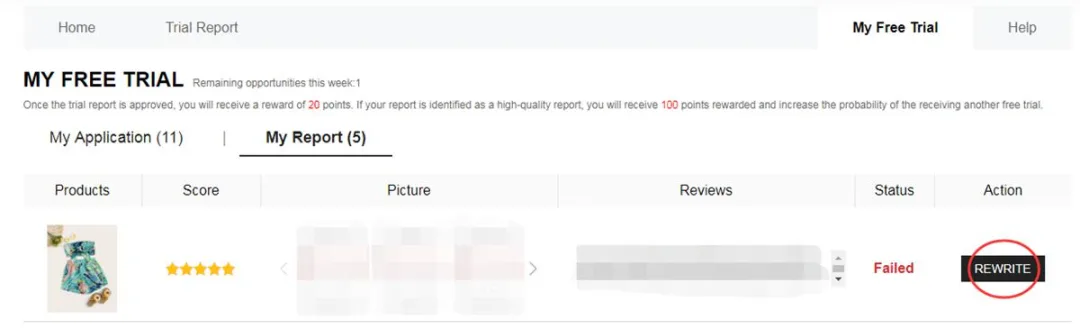
Dashboard screen indicating rejection and text editing option
Essential criteria for a quality review
Honest analysis highlighting advantages and areas for improvement
Objective details regarding fabric, sizing accuracy, and everyday comfort
Clear photos of the product being worn—avoid submitting images of just the packaging
Useful insights to assist other customers with purchasing decisions
Common mistakes that hinder approval
❌ Missing profile details or inaccurate measurement entries
❌ Shipping address country differing from the domain being accessed
❌ Submitting requests after the item allocation quota has closed
❌ Generic feedback without real product photos attached
❌ Failing to submit the review within the 10-day limit
❌ Neglecting to modify a rejected review via the Rewrite button
❌ Managing duplicate or fake accounts
Key program guidelines
Maximum quota of 3 attempts per week—remaining tries expire
Account profile country must match the active Shein browsing domain
Standard shipping is covered by Shein; local customs fees/duties are the user’s responsibility
Review must be published within 10 days of delivery
One correction opportunity is granted if a report is rejected
Duplicate accounts or inconsistent data lead to program disqualification
Frequently Asked Questions
Is shipping paid by the recipient?For approved requests, Shein covers standard shipping costs. Import duties or local taxes may apply separately depending on regional laws.
How many items can I apply for each week?Up to a maximum of 3 items per week. Unused attempts reset to zero for the following cycle.
Are participants allowed to keep received items?In the vast majority of cases, yes—provided the required review is approved within the designated timeframe. Always refer to specific item terms.
How long does it take to get results?Approximately 7 days. Track status updates in the My Applications / My Free Trial section.
What should I do if my review is rejected?The My Report tab will display Refused with the Rewrite button enabled once. Improve the written feedback, attach clearer photos, and resubmit promptly.
Do I need a large social media following?No follower count is required. A fully configured profile, quality reviews, and regular platform activity carry more weight than social media reach.
Workflow summary: navigate to Free Trial → select items (limit 3/week) → track status → if selected, await delivery → post review with photos → check My Report → edit once if rejected. Keep profile details accurate and adhere to deadlines.
Want to browse available items right now?
Open the official Free Trial area, check this week’s active options, and submit your requests following the steps above. Approval depends on spot availability.
You will be redirected to the official Shein page.
Reference source: Shein Free Trial Help Center